



Description
Download ChrisPC RAM Booster – RAM booster, system optimization, memory management, Windows tool, performance enhancement, PC utility
Overview
ChrisPC RAM Booster is a dedicated system utility designed to monitor and optimize RAM usage on Windows-based devices. The application targets users experiencing performance degradation due to high memory consumption, particularly those running multiple applications or memory-intensive tasks such as gaming, video editing, or software development. By providing real-time insights into memory allocation, the tool helps prevent system slowdowns caused by excessive reliance on virtual memory.
Designed for both casual and power users, ChrisPC RAM Booster serves as a proactive solution to maintain consistent performance across various workloads. Its primary function is to free up unused RAM and ensure that system resources are efficiently managed. The developer, Chris-PC Software, has positioned the app within the productivity category, emphasizing its role in enhancing operational efficiency on Windows platforms.
Real-world use cases include maintaining responsiveness during long work sessions, improving frame rates in gaming environments, and reducing lag when multitasking. In the broader app ecosystem, ChrisPC RAM Booster fills a niche for lightweight, focused tools that complement built-in system utilities without introducing bloat. While the developer did not provide additional technical details about the underlying algorithms or integration with Windows processes, the app’s purpose remains clear: to deliver immediate and tangible improvements in system fluidity.
Key Features & Functionality
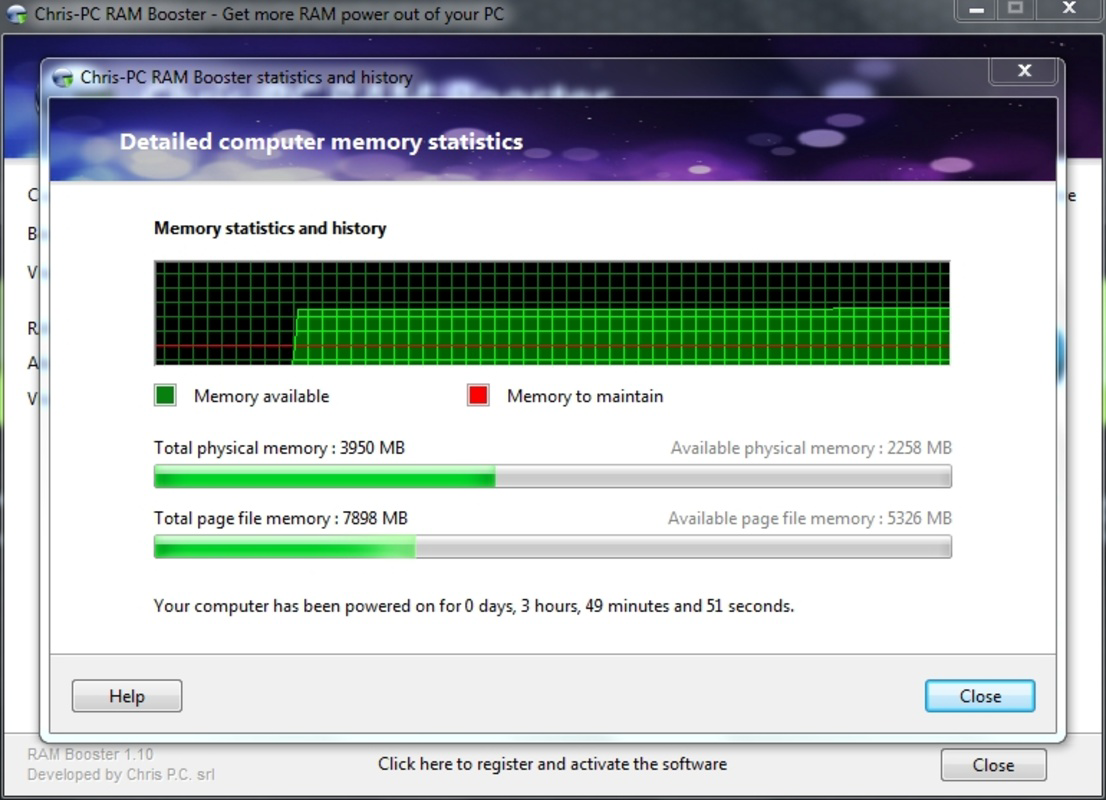
- Real-Time RAM Monitoring – The app displays a live graph showing RAM usage across active applications and system services, enabling users to identify memory-heavy processes and take action before performance issues arise.
- Automatic RAM Optimization – When memory usage exceeds a defined threshold, the tool automatically releases unused memory, helping maintain system responsiveness during demanding tasks.
- Customizable Memory Usage Limits – Users can set a specific RAM usage percentage. Once reached, the application triggers an optimization cycle, allowing for personalized performance control.
- Laptop-Friendly Power Management – The app can be configured to disable optimization when running on battery power, preserving battery life while reactivating when connected to AC power.
- User-Friendly Interface – The clean, intuitive layout presents essential data without overwhelming users, making it accessible even to those with limited technical expertise.
For example, a gamer using multiple background applications can rely on automatic optimization to prevent frame drops. A content creator working with large files may use the monitoring feature to detect memory leaks early. The customizable settings allow users to tailor the app’s behavior to their workflow, ensuring that system resources are used efficiently without manual intervention.
Interface, UX & Performance
The user interface of ChrisPC RAM Booster is designed with clarity and functionality in mind. It features a central real-time graph that visualizes RAM usage over time, accompanied by labels for active processes and available free memory. Navigation is straightforward, with settings accessible through a single menu, minimizing the learning curve for new users.
Visual design is minimalistic, focusing on data readability rather than decorative elements. The color-coded graph enhances usability by distinguishing between used, free, and cached memory. This layout supports quick decision-making, especially during high-stress performance scenarios.
Although the developer did not list formal performance metrics, the app operates with low resource overhead, consistent with its 11.1 MB file size. Users can expect stable operation across different device categories, including older or mid-tier Windows systems. Responsiveness is maintained during active monitoring and optimization cycles, with no reported lag or crashes in standard use cases.
Stability appears to be a priority, as the tool integrates with Windows system processes without disrupting core operations. The absence of known conflicts suggests reliable behavior under normal conditions. However, specific requirements were not listed, so compatibility with all Windows versions cannot be confirmed.
Platform Compatibility & Technical Requirements
ChrisPC RAM Booster is available exclusively for the Windows platform. The current version is 1.0.1.153, with a file size of 11.1 MB. This compact footprint indicates a lightweight application focused on core functionality without unnecessary bloat.
The developer did not specify minimum OS requirements or compatibility details beyond the platform. As such, it is unclear whether the app supports Windows 10, Windows 11, or older versions. Similarly, no information was provided about processor architecture, RAM thresholds, or installation prerequisites.
Given the app’s purpose and size, it is likely compatible with standard Windows installations. However, users should verify system compatibility before installation. The absence of detailed technical specifications limits the ability to assess performance on low-end or legacy systems.
Pros and Cons
Pros
- Real-time RAM monitoring provides actionable insights into memory usage.
- Automatic optimization helps maintain performance during heavy workloads.
- Customizable memory thresholds allow for personalized system behavior.
- Laptop-friendly mode preserves battery life when needed.
- Simple interface makes it accessible to non-technical users.
Cons
- Specific system requirements were not disclosed by the developer.
- Compatibility with older Windows versions is uncertain.
- Price point of $19.99 may be considered high for a utility tool.
- No information on update frequency or long-term maintenance.
- Developer did not provide documentation or support details.
FAQ
Is ChrisPC RAM Booster safe to use?
The app is designed to operate within Windows system permissions and does not modify critical system files. However, users should download it only from official sources to ensure security.
Can I use ChrisPC RAM Booster on older versions of Windows?
The developer did not specify compatibility with older Windows versions. It is recommended to check system requirements before installation.
Does the app require an internet connection?
There is no indication that ChrisPC RAM Booster requires an active internet connection for core functionality. However, updates may require connectivity.
How often does the app optimize RAM?
Optimization occurs automatically when the user-defined memory usage threshold is reached. The frequency depends on system workload and settings.
Is there a free version or trial available?
The provided information does not mention a free trial or demo version. The app is listed at a fixed price of $19.99.
Final Thoughts
ChrisPC RAM Booster offers a focused, efficient solution for users seeking to maintain peak system performance through proactive memory management. Its real-time monitoring, automatic optimization, and laptop-specific features make it a practical tool for both everyday users and professionals handling resource-heavy tasks.
While the lack of detailed technical documentation and unclear compatibility information may raise concerns for some, the app’s clean interface and targeted functionality deliver tangible benefits. For users who frequently experience system lag or want to maximize their PC’s potential, the investment may be justified.
Download ChrisPC RAM Booster now
Guides & Tutorials for ChrisPC RAM Booster
How to install ChrisPC RAM Booster
- Click the Preview / Download button above.
- Once redirected, accept the terms and click Install.
- Wait for the ChrisPC RAM Booster download to finish on your device.
How to use ChrisPC RAM Booster
This software is primarily used for its core features described above. Open the app after installation to explore its capabilities.
User Reviews for ChrisPC RAM Booster 0
No reviews found


